
Lecture 4
Instruction Scheduling (part 3)
Code:
a:  loadAI  r0,@w   => r1
b:  add     r1,r1   => r1
c:  loadAI  r0,@x   => r2
d:  mult    r1,r2   => r1
e:  loadAI  r0,@y   => r3
f:  mult    r1,r3   => r1
g:  loadAI  r0,@z   => r2
h:  mult    r1,r2   => r1
i:  storeAI r1      => r0,@w
Note: store can cause aliasing issue, so for our projects we will always use storeAI
Local (forward) List Scheduling
Step 1. Build the dependence graph
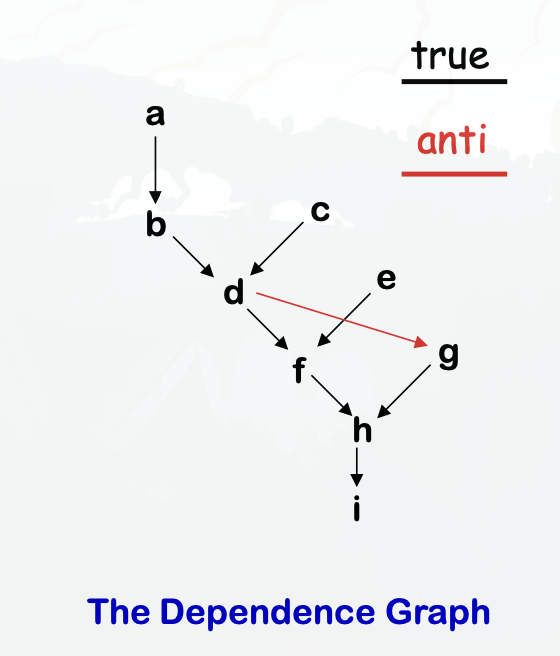
Step 2. Determine priorities
- Find the longest latency-weighted path
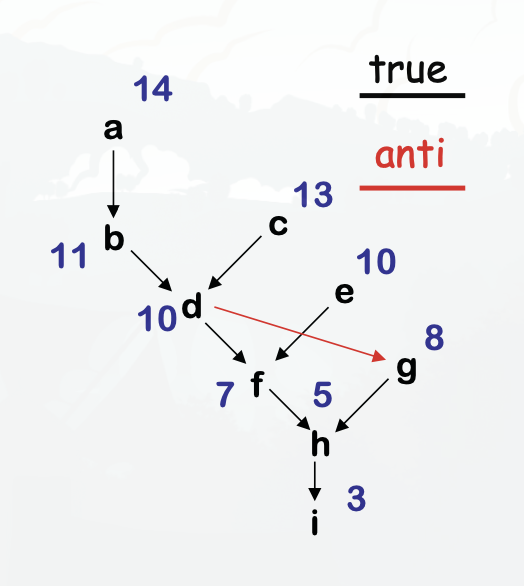
Example
- You can schedule the instructions efficiently by prioritizing scheduling instructions in the critical path
- Instructions that can be queued are stored in the Ready Set
- Instructions that are currently queued are in the Active Set
- You then traverse the graph, using the sets, and can generate more efficient, faster code.
Example:
| Cycle | Ready Set | Active Set | What happened |
|---|---|---|---|
| a, c, e | Move a to active set | ||
| 0 | c,e | a | |
| 1 | e | a, c | Move c to active set |
| 2 | a, c, e | Move e to active set | |
| 3 | b, c, e | Remove a from active set since it has finished, and add b to the ready set since it depended on a. Move b to active set | |
| 4 | d, e | Remove b and c from active set since they have finished, and add d to the ready set since it depended on b. Move d to the active set | |
| 5 | d | Remove e from the active set since it has finished. We can’t add f yet since it’s still waiting on d | |
| 6 | f | g | Remove d form the active set, and add f and g to the ready set. We schedule g first because it has a higher latency-weighted path. |
| 7 | g, f | Move f to the active set | |
| 8 | g, f | Nothing we can do here | |
| 9 | h | Remove g and f from the active set since they have both finished. Add h to the ready set, and move it to the active set. | |
| 10 | h | Nothing to do, waiting on h to finish | |
| 11 | Remove h from the active set, and add i to the ready set. Move i to the active set | ||
| 12 | Nothing to do, waiting on i to finish |
Generated Code
0:  a: loadAI r0,@w => r1
1:  c: loadAI r0,@x => r2
2:  e: loadAI r0,@y => r3
3:  b: add    r1,r1 => r1
4:  d: mult   r1,r2 => r1
5:
6:  g: loadAI r0,@z => r2
7:  f: mult   r1,r3 => r1
8:
9:  h: mult   r1,r2 => r1
10:
11: i: storeAI r1 => r0,@w
12:
By using the dependency graph and List scheduling, we turned 20 cycles into 14!
Algorithm
Cycle <- 0
Ready <- leaves of P
Active <- empty

while (Ready ∪ Active != empty)
  if (Ready != empty) then
    remove an op from Ready
    S(op) <- Cycle
    Active <- Active ∪ op

  Cycle <- Cycle + 1

  for each op ∈ Active
    if (S(op) + delay(op) <= Cycle) then
      remove op from Active
      for each successor s of op in P
        if (s is ready) then
          Ready <- Ready ∪ s
Formalisms
- A correct schedule maps each n in N into a non-negative integer representing its cycle number such that
- S(n) >= 0, for all n in N (obviously)
- If (n1, n2) in E, S(n1) + delay(n1) <= S(n2)
- For each type t, there are no more operations of type t in any cycle than the target machine can issue
The length of a schedule S, denoted L(S), is:
- L(S) = max(n in N)(S(n) + delay(n))
The goal is to find the shortest possible correct schedule. S is time-optimal if L(S) <= L(S1), for all other schedules S1.
Note: We are trying to minimize execution time here.
What’s so difficult?
Critical points
- All operands must be available
- Multiple operations can be ready
- Operands have multiple predecessors Together, these issues make scheduling hard (NP-Complete)
Local scheduling is the simple case
- Restricted to straight-line code (single basic block)
- Consistent and predictable latencies